Personal Information in a Resume: What to Include (and What to Skip)
If you’re unsure about what to put in your resume header, you’re not alone. The question of what personal info a resume requires comes up often.
Your resume’s personal information section is the small header area that identifies you and tells employers how to reach you. It should include your name, a professional title (if you have one), phone number, email, location, and relevant links. But it should leave out any sensitive information or anything that could trigger bias.
When written, the section should be short, professional, and easy to scan, whether it's being read by a recruiter or ATS.
What Personal Information to Include on a Resume
The goal here is pretty simple. Only include information that helps an employer identify you and contact you. Typically, the best personal data to use in a resume will be limited to what’s relevant, current, and low-risk from a privacy standpoint.
And a side note, since anyone in the world could be reading this. The information in this article is based on American and Canadian law. If you’ve been Googling about what personal information to put on a CV and getting contradictory information, that info could be relevant to other countries. So if you’re in the US or Canada, this info is for you.
Full Name and Professional Title
- Use the name you use professionally. That might be your legal name or something else
- Only add professional credentials if they matter to the role you’re applying for, for example, CPA or RN
- Add a clear target title, for example, Data Analyst or Senior Product Manager
Phone Number
- If possible, use a mobile number you regularly answer or that has a professional voicemail greeting
- Add a country code if you’re applying across borders or to remote roles with international teams
Email Address
- Use a clean format such as [email protected]
- Avoid using school addresses, nicknames, or anything that looks unprofessional
Location
- Use city + state or province (Austin, TX or Toronto, ON)
- Never include your street address
- If you’re relocating, you can add something like “Open to relocation” next to your current location
LinkedIn and/or Portfolio URL
- Add your LinkedIn if it’s up to date and aligns with the position you’re applying for and your application
- Include your portfolio, GitHub, or personal website if your work is better shown than told
- Customize your LinkedIn vanity URL so it looks clean on the page
Personal Information in Resume Example
Jordan Lee
Customer Success Manager
(555)123-4567 | [email protected] | Denver, CO | linkedin.com//jordanlee
- Name: Use your legal name or the name you use professionally
- Title: This should match the role you’re targeting
- Phone: Mobile preferred, plus a professional voicemail
- Email: A simple, readable address
- Location: City + state/province only, never a street address
- Link: Clean, customized LinkedIn URL, portfolio page, or professional website
If you want help with the perfect layout when it comes to things like spacing, separators, and fonts, consider using a resume builder. That will make your header formatting quick and consistent.
What Personal Information NOT to Include on a Resume
This has been touched on, but it deserves its own section.
In North America, omitting sensitive information can help protect your privacy and reduce the chance of you getting overlooked because of unconscious or very conscious bias. As a rule, if it's information that isn’t required to contact you or access your qualifications, leave it out.
Leave out the following:
- Age or date of birth, since this can introduce age bias
- Marital status, family status, number of children
- Photo/headshot unless you’re looking for work in the modeling or film industry
- National ID numbers: This would include Social Security/Social Insurance, passport number, plus state/province ID like driver’s license or health card numbers
- Religion, ethnicity, political views, or any kind of protected personal attributes
- Full home address: A street address is not required
- Personal social media accounts: Unless you’re applying to a role that specifically requires your Instagram, TikTok, or Facebook, in which case they need to be your professional accounts
Personal Details on a Resume: Dos and Don’ts
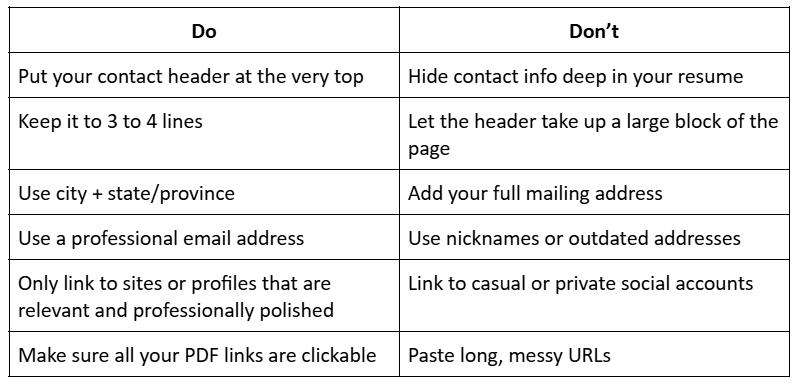
Tips for Formatting Your Personal Information Section
- Put it right at the top: Your header should be above your summary or objective statement
- Keep it consistent: Only use one font, one style, clean spacing, and the same separators throughout (example: |or · )
- Make it ATS-friendly: Don’t put your contact details in text boxes, headers/footers, or use graphic-heavy layouts, since some ATS tools will do a poor job of parsing them
- Use readable links: Shorten and clean up any URLs, especially LinkedIn
- Clarity over creativity: While you might be tempted to get creative, you could wind up making it harder for a recruiter to find your phone or email in seconds
Conclusion
The best resume headers are minimal. They list your name, target title, phone, email, location, and one or two relevant links. Do not include any private details that aren’t needed to get hired—like your picture if you’re applying for a modeling position—but could create privacy or bias concerns. Keep your personal details resume section clean, consistent, and easy for recruiters and ATS to read. And if you’re still unsure, CVMaker has an entire library of resume templates to choose from.